
Silverfin Insights: New Features and Improvements
Silverfin has enhanced its Insights module by introducing features such as recently used and recommended queries, renaming Segments to Queries, improving date selection for easier period filtering, and boosting processing speed to enable faster and simpler data analysis across client portfolios without manual data interrogation.
New and improved Silverfin Insights

3min Read
We gathered some great customer feedback recently on how we could improve our Insights module. Now it’s time to reveal the results!
But first, a reminder on what Insights is all about
It’s a powerful tool that lets you analyse data across your whole client portfolio.
There’s no need to manually interrogate an individual client’s Xero or Quickbooks instance, or any other system for that moment. Because all your data is centralised and standardised in Silverfin, it’s available to you in just a few clicks.
And with Insights you can set up automated triggers to notify the portfolio owner when certain KPIs, thresholds or other triggers have been met. Say, when a client has gone over the VAT registration threshold, or the director’s loan account has gone overdrawn.
So how did we enhance it?
In a nutshell, we wanted to make it simpler and faster to query the data.
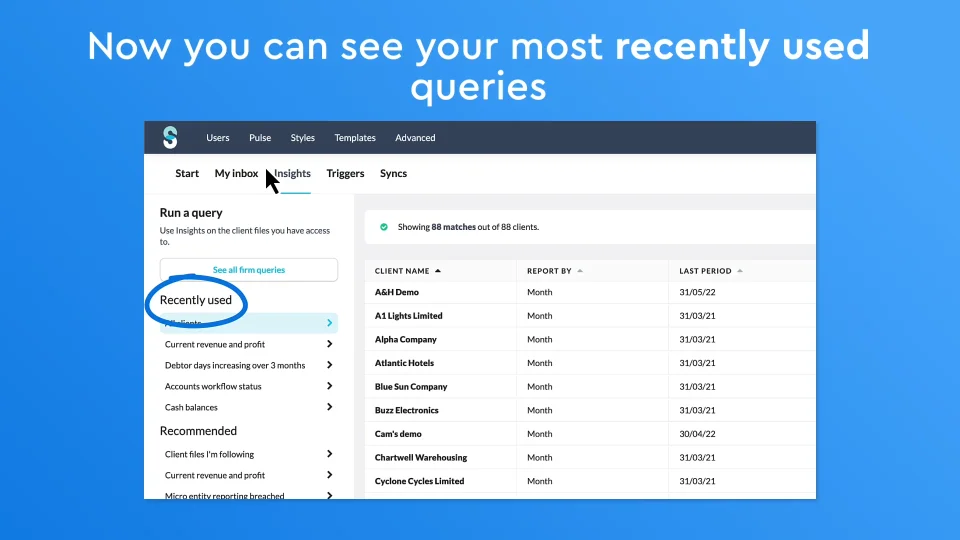
First we introduced ‘recently used’ queries, so now users can instantly access their most relevant queries. (Oh, and also we renamed Segments to Queries because that just sounded better).
We added Recommended queries too, to give you a helping hand and some inspiration. It’s often helpful to see commonly used queries for firms like yours.
The date selection feature is now more intuitive so you can quickly query specific periods or financial years.
Finally, we gave it a speed boost too. So if you run a complex query, it’ll process in the background, allowing you to continue to work in Silverfin, and just return to get the results whenever you want.
Silverfin Insights Improvements
Press O for more options
Click for sound
1:05
How Insights can help you?
It’s a sophisticated tool with so many possibilities, but here’s a flavour of how some of our customers are getting value from it:
- 1.Identifying clients that may be affected by changes to rules and regulations.
- 2.Monitoring key tasks across their portfolio so they can plan work more effectively.
- 3.Checking if any employees are struggling to meet deadlines and whether assistance is needed.
- 4.Spotting and following up on non-compliant files
- 5.Find examples of how colleagues have dealt with certain scenarios and learn how to effectively handle them in your own files.
- 6.Checking that the firm is meeting quality standards.
- 7.Identifying any client files with issues that could warrant a coordinated advisory campaign.
- 8.Tracking KPIs across clients and setting alerts for specific situations so they can communicate this in a timely, proactive manner.
There are more improvements planned, so watch this space!
More Posts

The Benefits of Digital Working Papers for Accountants
The use of working papers in accountancy started in the 19th century at the beginning of modern accountancy, and have evolved significantly over time. First ...
3 things that have to be true before we let an AI agent near your work
An accountant’s name goes on the work. Not the software’s or the model’s. That single fact shaped every decision we’ve made about letting AI agents ...

Mastering the Solution for Accounting Digital Transformation: Hurst’s Success With Silverfin
The accounting industry is at a crossroads. You need to either adapt to the digital era and embrace new technologies or risk exposing your firm ...

Cloud collaboration tools for accountants
Effortless collaboration has become an essential tool for accounting companies. Seamless communication and shared access to data and documentation help teams effectively manage deadlines, prepare ...

Accounting technology trends: Wrapping up 2024 and looking ahead to 2025
Discover how technology, AI and cloud solutions are shaping key trends, insights, and strategies to help accountants stay competitive in 2025 and beyond.

Make Your Working Papers Work: Comparing Top Tools
Bid farewell to the drudgery of manual data and spreadsheet management and say hello to intelligent digital templates. Learn more today.
Let’s Chat
Scroll to Top